

When you block a customer, all their tickets, including any created by agents on their behalf, are automatically marked as spam. Any future emails from that customer will also be automatically marked as spam.
Blocking a customer
Click on Customers.
Click on the customer name you want to block.
Click on the three-dot menu.
Click on Block. A modal should be displayed to confirm.
Click on Block.
Blocking an email before they've emailed you
If you want to block an email address in advance, you can manually create a customer record for that email and then block it.
1. Click on Customers.
2. Click on Add Customer.
3. Enter the email address in the form.
4. Click on Save.
5. Click on the newly created customer's name.
6. Click on the three-dot menu.
7. Click on Block. A modal should be displayed to confirm.
9. Click on Block.
Unblocking a customer
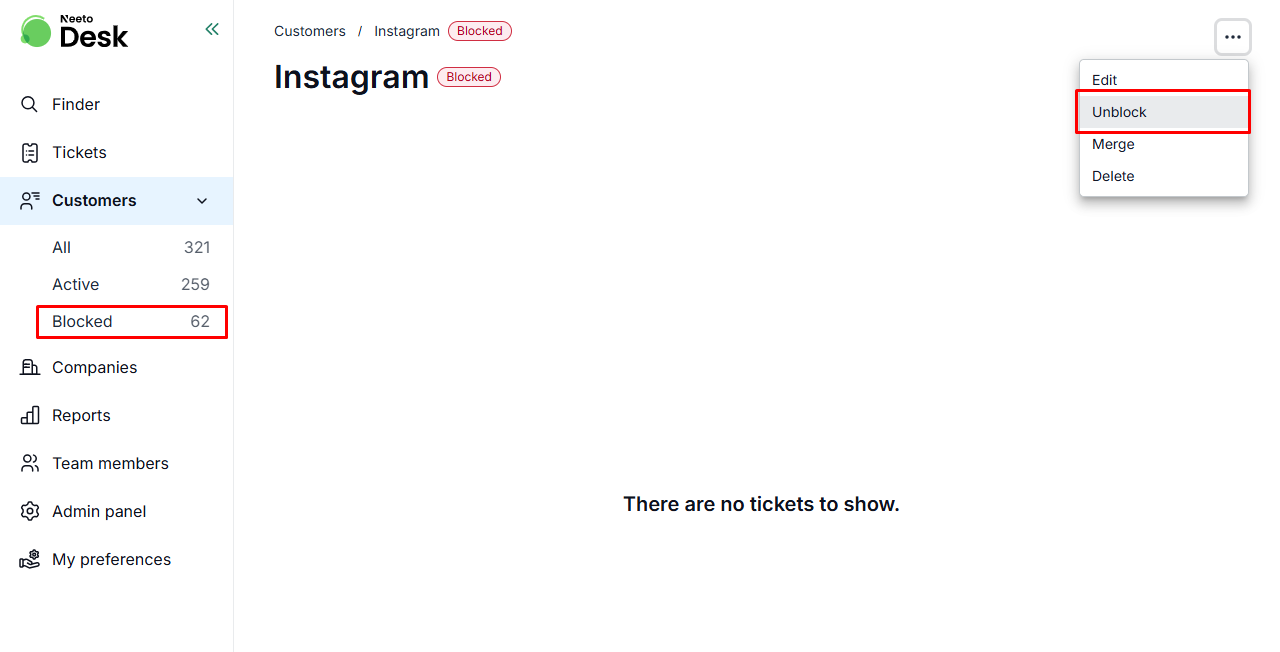
If you accidentally blocked a legitimate customer and want to receive their emails again,
1. Click on Customers.
2. Click the blocked customer's name.
3. Click the three-dot menu.
4. Click Unblock.
To block an entire email domain rather than individual customers, see Reject email domains.